CLI Reference
Status: Phase 1 (v0.1). Every
python -m cli.forge_clisubcommand, with one example per command. Source of truth:cli/forge_cli/main.pyandcli/forge_cli/sources.py. Last verified againstmainon 2026-05-10.
The CLI is a thin Python wrapper over the gateway HTTP API. It
needs a running gateway on the other end (docker compose up gateway,
or python -m api_gateway.server).
Invocation
After pip install -e ., use the forge console script:
forge <command> [args...]
Equivalently, run the module directly (no install step needed):
python -m cli.forge_cli <command> [args...]
Both entry points are identical. forge is a Python console-script (it
requires the project's Python environment, like forge-server). Examples in
this reference use python -m cli.forge_cli, but forge works everywhere in
its place.
Standalone binary (no Python required)
Install a prebuilt binary (from GitHub Releases):
# latest release, auto-detects your OS/arch
curl -fsSL https://raw.githubusercontent.com/FidelOdok/MetaForge/main/scripts/install.sh | sh

# or a specific version
curl -fsSL https://raw.githubusercontent.com/FidelOdok/MetaForge/main/scripts/install.sh | sh -s v0.1.0
This drops forge into ~/.local/bin (override with FORGE_BIN_DIR) and, if
that directory isn't already on your PATH, adds it to your shell profile
(.zshrc / .bashrc / .bash_profile / .profile) automatically. Restart your
shell afterward. Set FORGE_NO_MODIFY_PATH=1 to skip the profile edit and get a
manual instruction instead. Windows users download forge-windows-x64.exe from
the Releases page directly.
Binaries are published per platform on every v* tag by the release workflow
(.github/workflows/release.yml): forge-linux-x64, forge-macos-arm64, and
forge-windows-x64.exe. Intel Macs aren't prebuilt (GitHub is retiring Intel
runners) — build from source there.
Build it yourself with PyInstaller:
pip install -e ".[build]"          # installs pyinstaller
scripts/build_forge_binary.sh      # produces dist/forge
./dist/forge chat --help
The CLI is a thin HTTP client (only httpx + structlog beyond the standard
library), so the bundle stays small (~40 MB); the gateway/server stack is
excluded. The resulting dist/forge runs on its own — copy it onto a target
machine and run it directly.
Platform note: PyInstaller bundles for the platform it runs on. Build on each OS you want to ship (macOS / Linux / Windows) — typically a CI matrix — rather than cross-compiling. This is a developer/packaging step; most users should just
pip install -e .and use theforgeconsole script above.
Global flags
These work on every subcommand and must be passed before the subcommand name:
| Flag | Default | Purpose |
|---|---|---|
--format {table,json,compact} | table | Output rendering |
--gateway-url <url> | $METAFORGE_GATEWAY_URL, then the saved config, then http://localhost:8000 | Override gateway base URL |
python -m cli.forge_cli --format json --gateway-url http://gateway.local:8000 proposals
Interactive workspace (bare forge)
Running the standalone binary with no
subcommand in a terminal opens the interactive workspace: streaming chat plus
panes for runs, the twin, and a new run. It talks to the same gateway as the
Python CLI, but it is a separate front-end — the slash commands below are its
commands, not chat's.
forge                                   # open the workspace
forge --project "Monitor Build Demo"    # …already scoped to a project
forge ui --debug                        # verbose logging (see below)
| Flag | Purpose |
|---|---|
--project <id|name> | Start the chat scoped to a project. Takes an id, an exact name, or a unique substring (--project gimbal). An ambiguous or unknown name is reported on screen and the session starts unscoped |
--debug | Verbose logging, including raw SSE frames (see Logs & debugging) |
Any other flag (--help, --version, --gateway <url>) runs the scriptable
command layer instead of opening the UI. --project works there too, on the
one-shot turn:
forge chat -m "what's in this project?" --project "Monitor Build Demo"
| Key / command | Effect |
|---|---|
^T ^R ^B ^N | chat · runs · twin · new run |
PageUp / PageDn | Scroll the transcript |
/resume | Pick a previous session (title · scope · activity) and continue it — the transcript backfills and the server rebuilds the conversation's context per turn (MET-595). forge --continue / -c resumes the most recent session directly at launch |
/project [id|name] | Show the current project, or switch to one. Switching starts a new thread — see below. /project none leaves the project |
/model <slug> | Change the model for this session (persisted to ~/.forge/config.json) |
/provider <id> | Change the provider for this session |
/help | List the slash commands |
Esc | Quit |
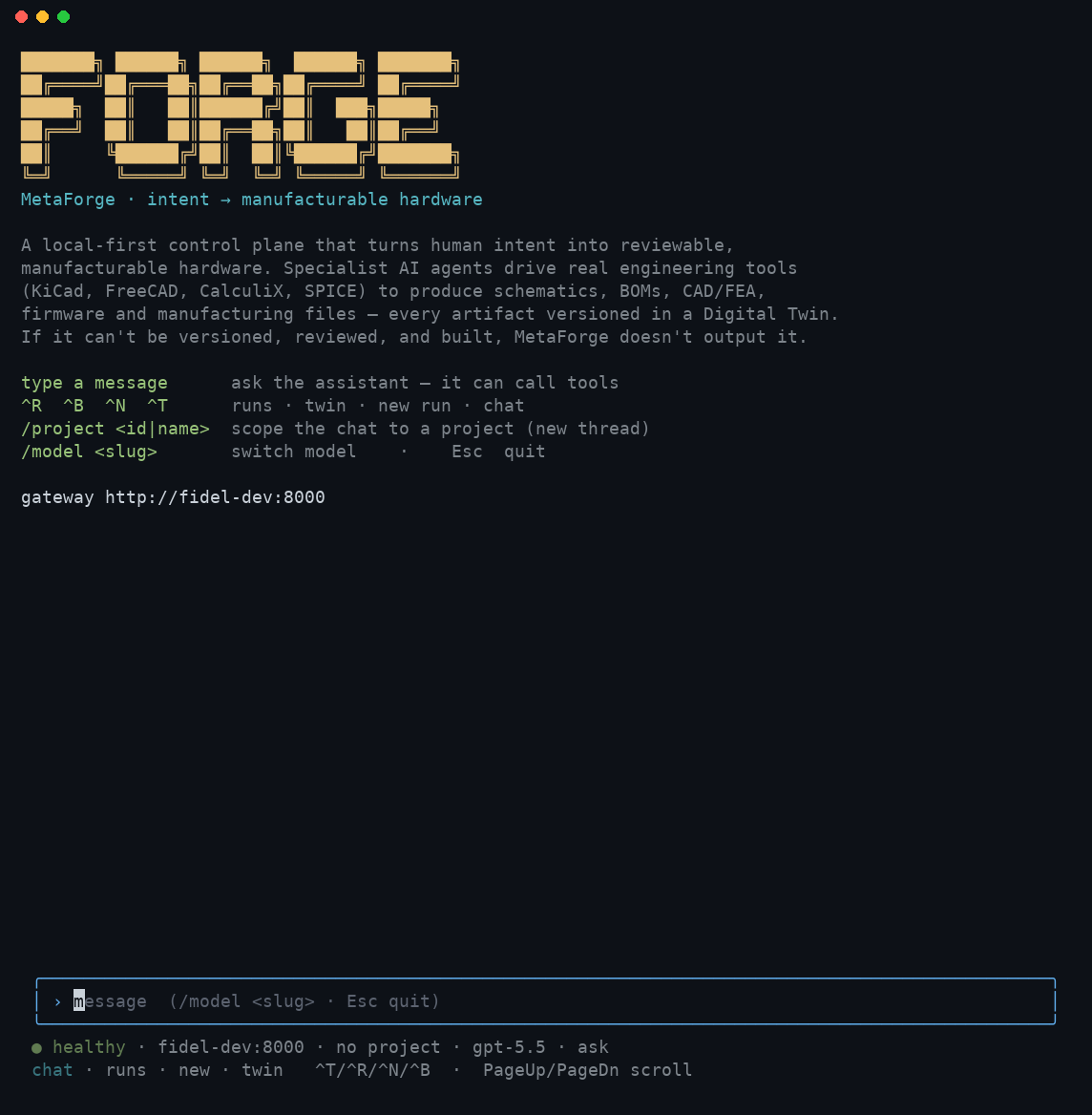
What it looks like
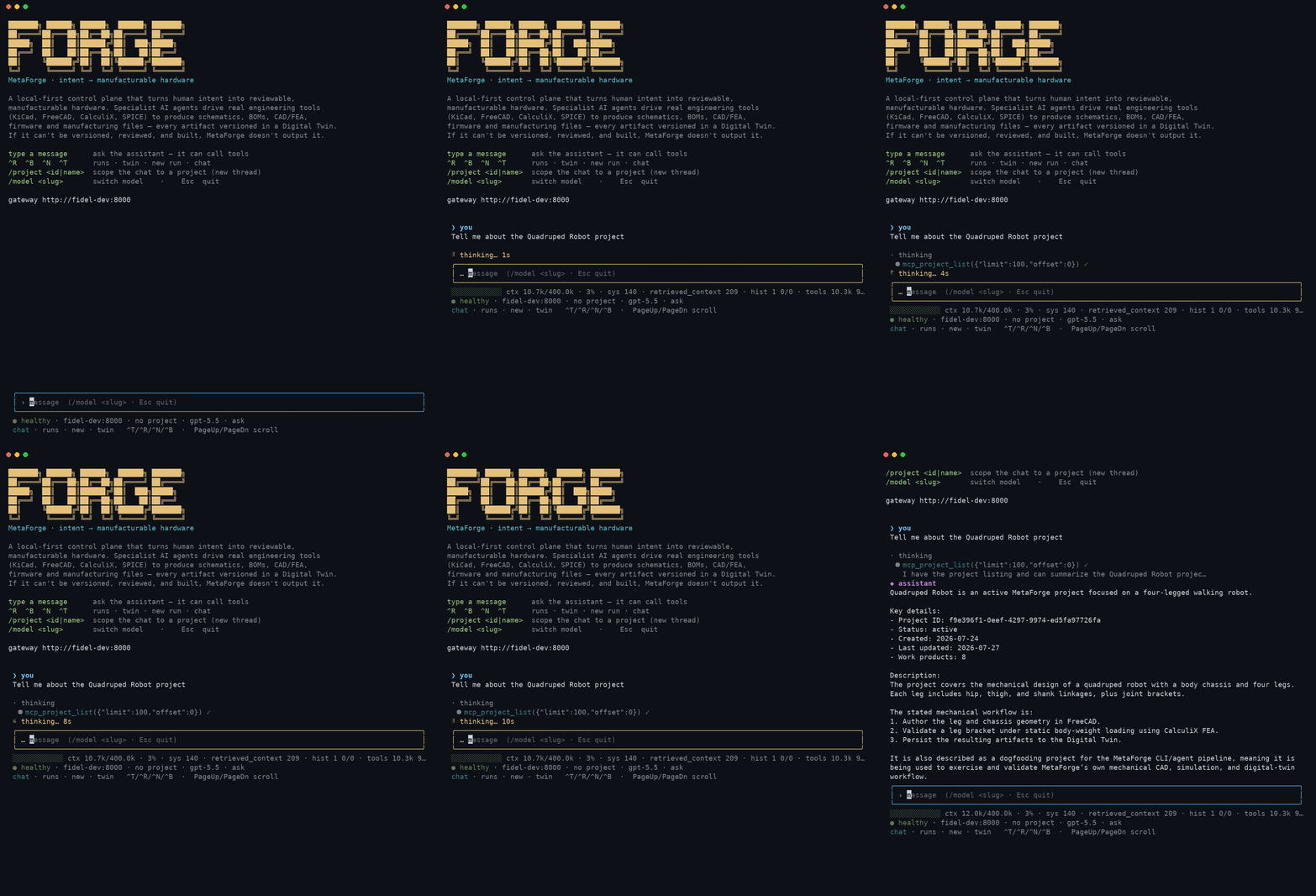
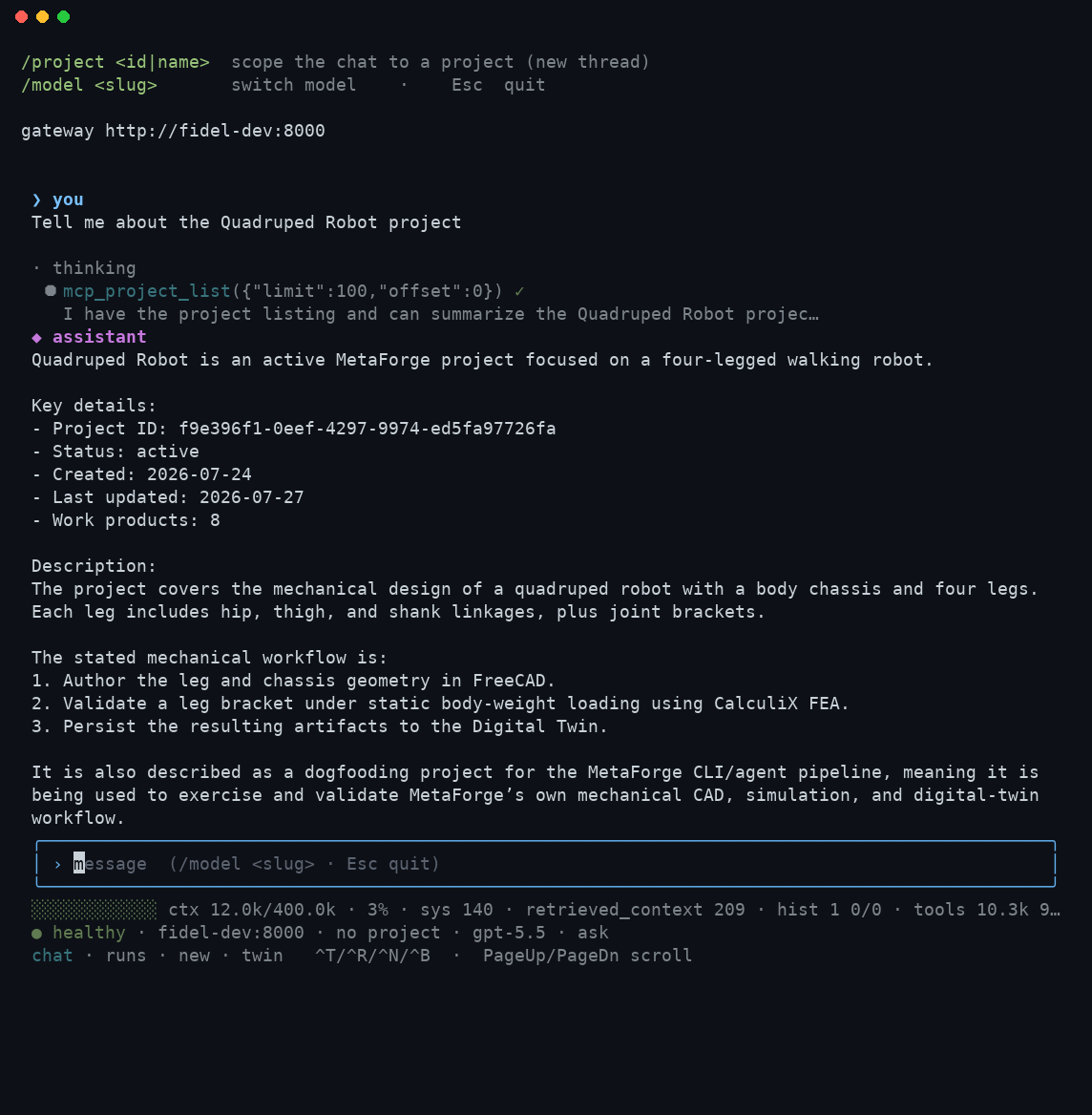
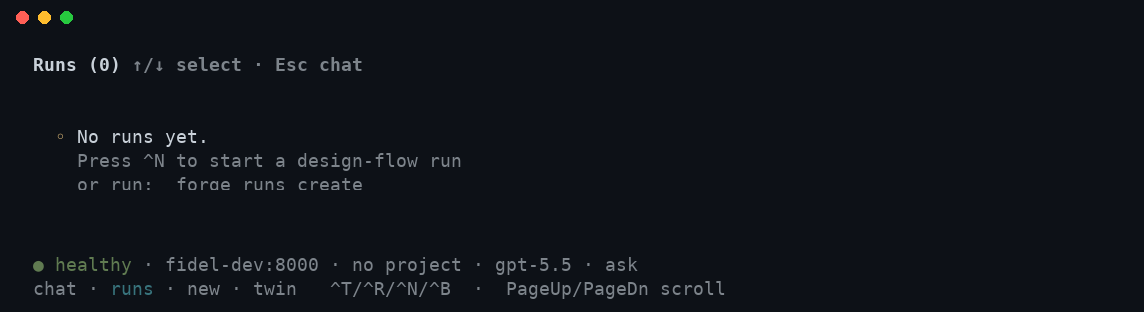
Real captures from the compiled binary (tmux driving forge against a live
gateway) — not mockups.
Launch — the welcome screen, a message composed and ready to send:
A turn in progress — the model calls a tool, then answers. This is the
literal answer to "Tell me about the Quadruped Robot project": one
project.get-style call, then a formatted response using what it returned.
The same turn once it settles, so the tool-call trace and the full answer are both visible at once:
The Runs pane (^R) — same footer, different content pane:
What "project" in the status line means
The project segment of the status footer is the scope of the live chat thread
(no project when there isn't one) — not a UI preference. Scope is fixed when
the gateway creates the thread (scope_kind / scope_entity_id), and a
project-scoped thread is the one that gets the
project brief prepended to every turn: the project's
intent, its work products, and the instruction to pass project_id when
committing CAD or recording a decision. So scope decides whether new deliverables
land in the project — an unscoped chat can still discuss it, but nothing it
produces is filed there.
Two consequences worth knowing:
/projectstarts a new thread. Typed by you, it switches by creating a new thread in the new scope, so the conversation restarts; the workspace says so in the transcript rather than letting you discover it when the agent has forgotten what you were discussing.- Asking the agent in prose does rescope — in place. "Switch to project X"
is answered by the agent calling
chat.set_project_scope, which rescopes the current thread rather than starting a new one — the conversation is kept, and the very next turn gets the new project's brief. An ambiguous or unknown name is refused (the agent won't guess), and it must say so explicitly rather than continuing to talk about the project as if the switch happened silently. Watch the footer either way: it always reflects the thread's real scope, whoever changed it.
Commands
tunnel — expose a local gateway to a hosted harness
forge tunnel up --check-only   # pre-flight, change nothing
forge tunnel up                # pre-flight, then run the tunnel
ChatGPT and claude.ai cannot reach localhost. This runs cloudflared
or ngrok (whichever is installed — neither is bundled) and gives you the
public URL to put in the harness.
It refuses to open one over a gateway that is not fit to be public: nothing listening, something that is not a MetaForge gateway, or a gateway that accepts unauthenticated connections. A tunnel does not change what the server enforces; it changes who can reach it, and an open gateway that is fine on a laptop is an unauthenticated write endpoint on the internet.
Writes from a tunnelled caller are held for approval — answer them in the dashboard, or from a client that supports MCP elicitation.
connect — find the gateway to point at
forge connect                 # probe the usual places
forge connect --url https://team.example.com/mcp   # check one specific URL
forge --format json connect   # machine-readable
Prints the MCP endpoint to use, or every candidate it tried and what each one said. Exits non-zero when nothing was found, so it works as a precondition check in a script.
A candidate only counts when it answers an MCP initialize and names
itself metaforge-mcp. Something listening on the port is not the same
thing: another MCP server answers initialize perfectly happily, and
reporting it would send you off to paste a URL that will never work. A
401/403 counts as found — the URL is right, the token is the next
step.
Order: the configured gateway (--gateway-url, METAFORGE_GATEWAY_URL,
or saved config), then the same host on :8765 (the MCP sidecar is a
separate service from the REST gateway in the standard compose file, so
<gateway>/mcp 404s), then the local defaults.
config — configure the CLI (wizard)
config                       # interactive wizard
config show                  # print current config
config path                  # print config file location
config set <key> <value>     # set one value (gateway_url|provider|model|mode)
Runs an interactive wizard that picks your gateway URL, lists the gateway's
providers and models (/v1/harness/*) for you to choose, and sets a
default mode. Saved to ~/.forge/config.json (override with $FORGE_CONFIG).
forge chat then uses these defaults, so you don't repeat --provider/--model
each run.
forge config                                 # guided setup
forge config set model claude-sonnet-5       # or set values directly
forge config show
Precedence, highest first: an explicit CLI flag, then the
METAFORGE_GATEWAY_URL env var, then the config file, then the built-in
default.
The config file used to outrank METAFORGE_GATEWAY_URL. That inverted the
usual convention — an environment variable exists to override persisted
config for a single invocation — and it had a real cost: a unit test that
set METAFORGE_GATEWAY_URL to a dead port to keep itself local was
silently ignored, and instead ingested documents into a shared dev
gateway on every run (11 such writes in one week, found in that
deployment's own logs).
If you relied on the old order, note that forge config set gateway_url
still works exactly as before whenever the env var is unset — which is the
normal case. Only a shell that exports METAFORGE_GATEWAY_URL now behaves
differently, and in that case the export is the more specific instruction.
config stores your client's choice of gateway and the per-turn
provider/model it sends. To give the gateway a credential (API key or a
ChatGPT subscription), use auth — it does
not set the METAFORGE_CHAT_HARNESS flag, which is a server-side setting.
auth — provider login & selection
auth list                          # providers with configured/active state
auth login [--provider P] [--method {api-key,oauth}] [--model M] [--no-activate]
           [--mode {auto,loopback,device,manual}] [--port N] [--no-browser]
auth use <provider> [-m MODEL]     # set the durable active provider/model
auth logout <provider>             # forget a stored credential
Log in to an LLM provider from the CLI — like opencode/OpenClaw — and the
credential is pushed once to the gateway (the shared runtime for CLI, TUI,
and dashboard) and stored 0600, so every client uses it with no restart.
- API key (any provider):
forge auth login→ pick a provider → enter the key at a hidden prompt. Stored in the gateway's auth store and injected into the model call (preferred over env). - ChatGPT/Codex OAuth (subscription, no API key): pick
openai-codex→ a browser OAuth loopback runs on your machine (localhost:1455); only the resulting token is sent to the gateway (written where the Codex adapter reads it). On a headless client use--mode deviceor--mode manual.
forge auth login --provider openai            # API key for OpenAI
forge auth login --provider openai-codex      # ChatGPT subscription (browser)
forge auth use openai gpt-4o                   # make it the active model
forge auth list
Active-selection precedence: an explicit chat --provider/--model flag → the
auth use selection stored on the gateway → the gateway's METAFORGE_LLM_*
env. If the gateway sets METAFORGE_HARNESS_ADMIN_TOKEN, the CLI sends it
automatically (from the same env var) so writes are authorized.
chat — interactive assistant REPL
chat [-m MESSAGE] [--thread ID] [--session ID] [--project ID] [--title T]
     [--provider P] [--model M] [--timeout S]
     [--mode {ask,auto,plan}] [--no-stream] [--no-color]
     [--hooks PATH] [--no-hooks]
A Claude-Code-style terminal front-end for the MetaForge assistant. It's a
thin client over the gateway's /v1/chat surface (harness-backed), so the
agent loop, tools, and approval gates all run server-side. Streams the answer
token-by-token, renders a live tool-call timeline, and prompts for approval on
gated design changes.
# Interactive session (default: streaming, ask-mode)
python -m cli.forge_cli chat

# One-shot, scriptable
python -m cli.forge_cli chat -m "What is the stress margin on the bracket?"
| Flag | Default | Purpose |
|---|---|---|
-m, --message <text> | — | One-shot: send a single message and exit |
--thread <id> | new thread | Reuse an existing chat thread |
--session <id> | random | Scope-entity id for a new thread |
--project <id> | — | Scope the chat to a project (see Project-scoped chat) |
--title <text> | CLI session | Title for a new thread |
--provider <id> | gateway default | Per-turn provider override |
--model <id> | gateway default | Per-turn model override |
--timeout <s> | 120 | Per-turn timeout (an agent turn runs inside the request) |
--mode {ask,auto,plan} | ask | How gated change proposals are handled (see below) |
--no-stream | off | Use request/refetch instead of SSE streaming |
--no-color | off | Disable ANSI colors |
--hooks <path> | .forge/hooks.json | Lifecycle-hooks config |
--no-hooks | off | Disable lifecycle hooks |
Permission modes
The consequential action in chat is a gated design-change proposal
(twin.propose_change). --mode (or /mode in-session) governs how new
proposals are handled after each turn:
| Mode | Behavior |
|---|---|
ask (default) | Prompt [a]pprove / [r]eject / [s]kip per proposal (interactive); one-shot mode just prints a notice |
auto | Auto-approve new proposals (prints a warning on entry) |
plan | Hold — list proposals but never apply them (nothing mutates the twin) |
Project-scoped chat
Pass --project <id> to tie the conversation to a project. The thread is created
with scope_kind=project, and every turn is led by a project brief injected
into the agent's context: the project name, intent, and the list of work products
already in its digital thread. The agent grounds its answers in that context and
is told to pass project_id="<id>" when it commits new CAD or records a decision,
so new deliverables land in the same project.
# List projects, then chat scoped to one
python -m cli.forge_cli projects list
python -m cli.forge_cli chat --project 250aec91-6d31-4a26-bb71-5e0d1e6fedb9
Once scoped, ask the agent about the project ("what's in this project?", "what did we decide about the base plate?") and it answers from the work products; ask it to build geometry and the result is saved back into the project.
Mid-conversation you can also just ask the agent to switch: "switch to the Foo
project" (or "leave the project") makes it call chat.set_project_scope, which
rescopes the same thread in place — the conversation is kept, and the next
turn's brief reflects the new project. This works whether the thread started
scoped or unscoped. An ambiguous or unknown name is refused rather than guessed,
and the agent must tell you explicitly that it switched.
From prompt to CAD
There are three paths from a typed intent to a committed cad_model work product
(all record into the twin as loadable, dashboard-visible geometry):
| Path | Command | When |
|---|---|---|
| Text → CAD (LLM compiles a spec, deterministic build) | forge cad from-text "<description>" [--project-id <id>] | Plain-English input with reproducible output: the LLM emits the spec, which is then built deterministically and echoed back for review |
| Deterministic assembly (no LLM) | forge cad build <spec.json> [--project-id <id>] | Reliable, repeatable multi-part geometry from a hand-authored spec — best when you already know the exact geometry |
| Agent-driven | forge chat --project <id> then ask it to build the part | Exploratory / conversational authoring; the agent drives the FreeCAD tools and commits by reference |
| Single primitive | forge design "<goal>" --project-id <id> | A quick one-shot primitive via the gated design flow |
The declarative spec (shared by cad build and produced by cad from-text) is a
JSON object {name, parts:[…], project_id?} where each part is a
box/cylinder/cone/sphere with parameters, and optional position,
holes, fillet, and chamfer. See
examples/cad/
for the full Pan-Tilt Gimbal reference (base, yaw, pitch).
# Text → CAD: describe it, get a reviewable spec + committed model
python -m cli.forge_cli cad from-text \
  "a 100x100x6 base plate with 4 M3 corner holes and a 40mm dia, 45mm tall boss" \
  --project-id 250aec91-6d31-4a26-bb71-5e0d1e6fedb9
from-text needs the gateway's chat harness + an LLM provider configured (it
uses the LLM only to translate text → spec; the geometry is authored by the same
deterministic builder as cad build). If the description can't be turned into a
valid spec it returns a clear 422 rather than building something wrong.
Add --dry-run to compile and review the spec without building it — it
prints a per-part summary, flags any geometry problems, and emits the full spec
JSON. Save that JSON and run forge cad build <file> for a fully deterministic
build, or drop --dry-run to build immediately:
python -m cli.forge_cli cad from-text "a rounded 60x40x8 bracket" --dry-run > bracket.json
# review/edit bracket.json, then:
python -m cli.forge_cli cad build bracket.json --project-id <id>
Slash commands (interactive)
| Command | Effect |
|---|---|
/help | List commands |
/model [provider] <model> | Show or set the provider/model for the session |
/mode [ask|auto|plan] | Show or set the permission mode |
/plan | Shortcut for /mode plan |
/thread | Show the current thread id |
/clear | Start a fresh thread (clears context; keeps the --project scope) |
/exit, /quit | Leave the chat |
Hooks
Run your own shell commands on lifecycle events by creating .forge/hooks.json:
{
  "hooks": {
    "session_start": [{"command": "echo session started"}],
    "user_prompt":   [{"command": "echo \"you asked: $FORGE_HOOK_MESSAGE\""}],
    "post_turn":     [{"command": "./scripts/on_turn.sh"}],
    "session_end":   [{"command": "echo bye"}]
  }
}
Events: session_start, user_prompt (before send), post_turn (after the
reply), session_end. Each command receives the payload as FORGE_HOOK_*
environment variables (e.g. FORGE_HOOK_EVENT, FORGE_HOOK_MESSAGE,
FORGE_HOOK_THREAD_ID) and as JSON on stdin. Hooks are best-effort — a failure
or timeout logs a warning and never breaks the turn.
Note: the assistant only produces replies when the gateway has an LLM provider configured for the harness (
METAFORGE_CHAT_HARNESS+ credentials). Without one,forge chatstill runs but reports "no reply".
routine — scheduled background runs
routine [--file PATH] {add,list,remove,run-due}
routine add "<prompt>" --every 30m [--provider P] [--model M] [--mode M]
routine list
routine remove <id>
routine run-due
A daemonless way to run assistant prompts on a schedule (the "routines" idea).
Routines are stored in .forge/routines.json; run-due fires every routine
whose interval has elapsed (creating an assistant thread and sending the prompt)
and records last_run. Wire run-due to OS cron or a loop for real scheduling:
# add a nightly design-review prompt
python -m cli.forge_cli routine add "Review the latest DRC results" --every 1d

# in crontab: fire due routines every 15 minutes
*/15 * * * * python -m cli.forge_cli routine run-due
Intervals are 30s / 10m / 2h / 1d (not full cron). Each run-due is
best-effort — one routine's failure doesn't stop the others.
run — invoke a skill
run <skill_name> --work_product <uuid> [--params JSON] [--session-id <uuid>]
Triggers a skill against a target work product via the gateway's
/v1/skills/run endpoint. Returns the resulting session id and the
skill's output payload.
| Arg / flag | Required | Notes |
|---|---|---|
skill_name | yes | Registry id (e.g. validate_stress) |
--work_product <uuid> | yes | Target node id |
--params <json> | no | JSON object; default {} |
--session-id <uuid> | no | Existing session to attach to |
python -m cli.forge_cli run validate_stress \
  --work_product 4f1c-... \
  --params '{"load_n": 500, "axis": "x"}'
status — session status
status <session_id>
python -m cli.forge_cli status 8e2a-...
Returns the current state, the agent that owns the run, and the last few tool calls. Useful when chasing a long-running workflow.
twin query — fetch a node
twin query <node_id>
python -m cli.forge_cli twin query 7c91-...
Properties + first-hop neighbours. Same data the
twin.get_node MCP tool returns; this is the CLI surface.
twin list — filter work products
twin list [--domain <domain>] [--type <work_product_type>]
python -m cli.forge_cli twin list --domain electronics --type schematic
| Flag | Notes |
|---|---|
--domain | One of: mechanical, electronics, firmware, simulation, … |
--type | Work-product type: cad_model, schematic, bom, etc. |
twin history, twin diff, twin baseline: revisions and baselines
twin history <KEY> [--project <id|name>]
twin diff <KEY> [@a] [@b] [--project <id|name>]
twin baseline list --project <id|name>
twin baseline diff <baseline-id> <baseline-id|current>
python -m cli.forge_cli twin history CAD-BRACKET
python -m cli.forge_cli twin diff CAD-BRACKET @2 @3
python -m cli.forge_cli twin baseline list --project "Shelf"
python -m cli.forge_cli twin baseline diff 4f1c... current
Opt-in views over items (FORGE-526, see Twin schema section 2.31); the normal flow needs none of them, because writes create revisions and gate approvals record baselines on their own.
historylists every revision of one item with its status (committed,draft,approved,rejected,abandoned), the head marker, the run and gate, and the change reason.diffcompares two revisions. With no revisions it compares the current one with the one before it; with one, that revision with the current one. It prints the geometry delta (volume, mass, bounding box, and whether the numbers came from the STEP files or from what each revision recorded), parameter, requirement and field changes, and the records still pinned to the older revision.baseline listshows a project's baselines, newest first, with gate, run, approver and item count.baseline diffcompares two of them item by item (unchanged,changed,added,removed);currentas the second id compares a baseline with the project's current items.
Add --format json for the raw gateway response.
twin migrate: fold a project's legacy nodes into items
twin migrate <project_id|name> [--apply] [--yes] [--reason <text>]
# Dry run: print the plan as a table (nothing is written)
python -m cli.forge_cli twin migrate e7b896cc-...
# The plan as JSON, for review or scripting
python -m cli.forge_cli --format json twin migrate e7b896cc-...
# Show the plan, confirm, then apply exactly that plan
python -m cli.forge_cli twin migrate e7b896cc-... --apply --reason "reviewed with the team"
Turns a project's nodes written before items existed into items and
revisions (the migration).
It always shows the dry run first: every proposed item with its revisions
(node id, name, created_at, status, and the rule and evidence that grouped
it), groupings flagged [REVIEW], the phase-summary decisions it will mark
as run summaries, the simulation results it will pin (and which are stale),
and counts before and after.
| Flag | Notes |
|---|---|
--apply | After the dry run, ask for confirmation and apply that exact plan. Nothing is deleted. The gateway refuses it (409) if the twin changed since the dry run; run the command again |
--yes | Skip the confirmation |
--reason | Why the plan is approved; kept in the gateway log with who approved it |
Running it again after an apply prints "Nothing to migrate". Served by
POST /v1/twin/projects/{id}/item-migration/plan and .../apply.
approvals: review and decide pending approvals
approvals list [--project <id>] [--kind <kind>] [--all | --decided] [--json]
approvals show <id> [--json]
approvals approve <id> [--reason <text>] [--json]
approvals reject  <id> --reason <text> [--json]
approvals retry   <id> --reason <text> [--json]
approvals rework  <id> --to <phase> --reason <text> [--json]
One place to see and decide every pending human decision (design-flow gates,
tool calls, flow proposals, design changes, sketches, drawings), served by
/v1/approvals. Ids are <kind>:<native id>, for example gate:run_abc,
tool:run_def, change:<uuid>.
listshows pending items by default;--decidedshows only decided ones and--allshows both.--projectand--kindfilter. Items with no project are counted separately and noted under the table (the count isunscoped_countin--json).showprints the whole card: summary, findings, the decisions allowed now, the decisions that need a reason, the rework targets, whether it is decidable (and why not), the kind-specific detail, and the recorded decision once decided.approve,reject,retryandreworkfirst read the item, then check the decision locally againstallowed_decisions,reason_required_forandrework_targetsso a bad request fails fast without posting.--jsonprints the raw gateway item (or list), so an agent can drive it.
Requests carry X-MetaForge-Surface: cli. If both METAFORGE_APPROVAL_AGENT and
METAFORGE_APPROVAL_ON_BEHALF_OF are set the surface is agent and the
on-behalf-of user is attached. METAFORGE_AUTH_TOKEN, when set, is sent as a
bearer token.
Exit codes (the same in the Python CLI and the forge binary):
| Code | Meaning |
|---|---|
0 | Success |
1 | Other failure (network error, 5xx) |
2 | Usage error (missing or unknown argument) |
3 | Not found: no approval with that id (HTTP 404) |
4 | Not decidable right now: expired, waiting on the elicitation route, gate not ready, retries or rework exhausted (HTTP 409) |
5 | Invalid decision: not in allowed_decisions, bad --to phase, or missing required reason (HTTP 422, or the same check failing locally) |
6 | Not authorized (HTTP 401 or 403) |
python -m cli.forge_cli approvals list --project 6f1c... --json
python -m cli.forge_cli approvals show gate:run_abc
python -m cli.forge_cli approvals rework gate:run_abc --to design --reason "bracket too thin"
The older commands remain as aliases on the same API: runs approve|reject <run_id>
decides gate:<run_id>, and approve|reject <change_id> (and forge proposals approve|reject in the forge binary) decides change:<change_id>. They now
honour the same local checks and exit codes, so a reject that the gate requires
a reason for needs --reason.
proposals — list pending proposals
proposals
Lists every change proposal that's still in pending. The output
includes change_id (use it with approve / reject, or as
change:<change_id> with approvals), the
proposing agent, the target work product, and the diff summary.
approve / reject — act on a proposal
approve <change_id> --reason "..."
reject  <change_id> --reason "..."
Aliases for approvals approve|reject change:<change_id>. Both require a
--reason (audit trail). --reviewer is still accepted but ignored: the
approver identity now comes from the authenticated caller and the
X-MetaForge-Surface headers.
python -m cli.forge_cli approve 1a2b-... --reason "fits power budget"
python -m cli.forge_cli reject  1a2b-... --reason "BOM cost over budget"
ingest — index docs into the knowledge layer
ingest <path> [--type <knowledge_type>] [--no-recursive] [--dry-run]
              [--work-product <uuid>] [--metadata <json>] [--timeout <seconds>]
Ingests a file or a directory tree into the L1 knowledge layer. Same
backend the knowledge.ingest MCP tool uses — this CLI is the second
surface for the same store.
| Flag | Default | Notes |
|---|---|---|
path | (required) | File or directory |
--type | inferred from path | design_decision / component / failure / constraint / session |
--no-recursive | off | When path is a directory, only its immediate children |
--dry-run | off | Print what would be ingested; make no HTTP calls |
--work-product <uuid> | none | Tag every chunk with a source_work_product_id |
--metadata <json> | none | Extra metadata round-tripped on search hits |
--timeout <seconds> | 300 | Per-request HTTP timeout (env: METAFORGE_INGEST_TIMEOUT) |
# One file with explicit type
python -m cli.forge_cli ingest tests/fixtures/datasheets/rp2040.txt \
  --type component \
  --metadata '{"vendor": "Raspberry Pi", "mpn": "RP2040"}'

# Whole directory, dry run first
python -m cli.forge_cli ingest docs/decisions/ --type design_decision --dry-run
python -m cli.forge_cli ingest docs/decisions/ --type design_decision
sources list — list ingested sources
sources list [--type <knowledge_type>] [--project <uuid>] [--limit <n>]
python -m cli.forge_cli sources list
python -m cli.forge_cli sources list --type component --limit 25
Default columns: knowledge_type, source_path, fragment_count,
indexed_at. Pass --format json to get the raw envelope.
sources show — single-source detail
sources show <source_id>
python -m cli.forge_cli sources show 'datasheet://rp2040'
Renders metadata + chunks. source_id is the source_path you used
at ingest time. Exits 2 with Error: source not found … if the
path is unknown.
sources delete — purge a source
sources delete <source_id> [--yes]
python -m cli.forge_cli sources delete 'datasheet://rp2040' --yes
Removes every chunk for a source. Without --yes the CLI asks for
interactive confirmation. Returns the count of deleted chunks.
design — run a gated design flow
design <goal> [--flow hardware_v1|mech_v1|design_v1] [--project-id <uuid>]
              [--no-start] [--no-watch]
# Design a board end to end and watch the phase/gate transitions stream
python -m cli.forge_cli design "an I2C IMU breakout board, 3.3 V from 5 V USB, 25 x 20 mm"

# Scope it to a project and pick a flow
python -m cli.forge_cli design "a self-balancing robot controller" \
  --flow hardware_v1 --project-id <uuid>
A friendly wrapper over runs create for the design-flow
harness: it starts the gated flow for a
product goal, prints the run id, and (by default) streams the live phase/gate
transitions. --flow picks the lifecycle (hardware_v1 full 7-phase, mech_v1
mechanical vertical, design_v1 demo); --no-watch returns immediately;
--no-start creates the run without starting it. Each run pauses at every gate
for human sign-off — approve with runs approve <run_id>.
When --project-id is omitted the command auto-creates a project named from
the goal and scopes the run to it, so the deliverables show on the Projects page;
pass --project-id to target an existing project instead.
cad build — author a multi-part assembly
cad build <spec.json> [--project-id <uuid>]
python -m cli.forge_cli cad build examples/cad/gimbal-base.json --project-id <uuid>
Authors a complex, multi-part CAD assembly deterministically (no LLM) from a
declarative spec and commits it to the twin as a loadable cad_model. The spec is
a JSON object { "name", "parts": [ … ], "project_id"? }, where each part is a
primitive:
{
  "name": "Gimbal Base",
  "parts": [
    {"name": "Base Plate", "kind": "box", "parameters": {"width": 100, "length": 100, "height": 6}},
    {"name": "Yaw Housing", "kind": "cylinder", "parameters": {"radius": 20, "height": 45}, "position": [50, 50, 6]},
    {"name": "Tripod Boss", "kind": "cylinder", "parameters": {"radius": 10, "height": 8}, "position": [50, 50, -8]}
  ]
}
kind is one of box / cylinder / cone / sphere; position is an optional
[x, y, z] in mm. A part may also carry holes — mounting/fastener holes drilled
into it (a boolean subtract, so no PartDesign body is needed):
{"name": "Mount Plate", "kind": "box", "parameters": {"width": 50, "length": 50, "height": 5},
 "holes": [{"x": 6, "y": 6, "diameter": 3.4}, {"x": 44, "y": 44, "diameter": 3.4}]}
Each hole has x, y (centre in the part's local frame), diameter, and an
optional depth (through-hole if omitted). Under the hood it drives the FreeCAD tools
(create_primitive → create_assembly → add_part_to_assembly → export_model) and
commits via the geometry recorder — the reliable, blob-in-Python path that needs
no LLM. Prints the committed node id and its viewer URL.
projects — list, inspect, and delete projects
projects list [--json] [--status <status>]
projects get <project_id> [--json]
projects delete <project_id> [--yes]
# See every project (or just the drafts)
python -m cli.forge_cli projects list
python -m cli.forge_cli projects list --status draft

# Inspect one, then delete a stale draft
python -m cli.forge_cli projects get <uuid>
python -m cli.forge_cli projects delete <uuid> --yes
The Projects API surface (/v1/projects). list prints a table of id / name /
status / work-product count (--status filters, e.g. to find draft projects to
clean up); delete asks for confirmation unless --yes is passed.
runs — drive harness runs directly
runs create [--goal <text>] [--request-json <json>] [--no-start]
runs list [--json]
runs get <run_id> [--json]
runs watch <run_id>
runs approve <run_id> [--reason <text>]
runs reject <run_id> [--reason <text>]
The lower-level surface over /v1/runs. runs create --request-json '{...}'
takes a full run request (used by design under the hood); watch streams a
run's SSE status; approve/reject resolve a run paused at a gate and are
aliases for approvals approve|reject gate:<run_id>. Use
approvals retry and approvals rework for the other two gate decisions.
Output formats
--format table (default) prints a fixed-column ASCII table.
--format json dumps the gateway response verbatim — best for
piping into jq. --format compact is the smallest one-line-per-row
form, useful in scripts.
python -m cli.forge_cli --format json sources list | jq '.sources[].sourcePath'
Environment variables
| Var | Used by | Purpose |
|---|---|---|
METAFORGE_GATEWAY_URL | every command | Base URL for the gateway |
METAFORGE_HARNESS_ADMIN_TOKEN | auth (client + gateway) | If set on the gateway, credential writes require it; the CLI sends the matching value from this env var |
METAFORGE_AUTH_TOKEN | approvals | Bearer token sent with approvals requests when set |
METAFORGE_APPROVAL_AGENT + METAFORGE_APPROVAL_ON_BEHALF_OF | approvals | When both are set, requests use surface agent and name the agent and the user it acts for (sent as X-MetaForge-Agent and X-MetaForge-On-Behalf-Of) |
METAFORGE_INGEST_TIMEOUT | ingest | Override the default 300 s timeout |
METAFORGE_MAX_OUTPUT_TOKENS | chat (gateway-side) | Output-token cap per model completion (default 8192) |
FORGE_LOG | forge (TUI) | 1/true enables verbose logging (raw SSE frames); same as --debug |
FORGE_LOG_FILE | forge (TUI) | Override the log path (default ~/.forge/logs/session.log) |
Logs & debugging the interactive TUI
The interactive forge TUI owns the terminal, so it cannot print diagnostics to
the screen without corrupting the UI. Instead it appends a JSONL session log to
~/.forge/logs/session.log — always on, a few lines per session:
chat.thread_created/chat.stream_open— stream lifecyclechat.send— a turn was submitted (chars,model,provider)chat.turn_done— one line per turn withevents,deltas,chars, and areasonwhen the turn came back empty (e.g."N delta event(s) but 0 characters — likely an SSE payload/parse mismatch"). This is the signal that turns a "(no reply)" into a diagnosable cause.chat.stream_error_event/chat.stream_failed— transport/agent errorschat.stream_closed_reconnecting/chat.stream_reconnecting/chat.stream_connected— the SSE stream auto-reconnects with backoff on a dropped/restarted gateway; the workspace shows a "reconnecting…" indicator and resumes when it's back
Run with --debug (or FORGE_LOG=1) to also capture every raw SSE frame
(sse.frame) and a sse.empty_delta warning whenever a delta event carries no
text — the exact fingerprint of a payload/parse mismatch:
forge --debug            # interactive TUI, verbose logging on
tail -f ~/.forge/logs/session.log | jq .
An empty assistant turn now shows why inline — (no reply — <cause>) — instead
of a single opaque string.
Troubleshooting
If a command hangs or returns a connection error, check
troubleshooting.md for the gateway-down /
WSL2 / .mcp.json recovery paths.